Thursday, February 5, 2015

Oracle Weblogic Server : Enabling Log rotation of .out file

There is no way to rotate out file from Oracle Weblogic Server Console or EM. To enable log rotation of the out log file on a Linux-based system, perform the following steps:
1. Ensure that you have the logrotate binary installed on your operating system:
ls /usr/sbin/logrotate
2. Create a logrotate configuration file (for example, under /home/oracle/ scripts/logrotate.conf) with the following contents, setting [Domain] to your domain name:
/home/oracle/SOA_DOMAIN/servers/soa_Srv01/logs/soa_Srv01.out {
missingok
copytruncate
compress
rotate=5
size=5M
}
3. Create a logrotate status file (for example, under /home/oracle/scripts/ logrotate.status) with the following contents, setting [Domain] to your domain name:
logrotate state -- version 2
"/home/oracle/SOA_DOMAIN/servers/soa_Srv01/logs/soa_Srv01.out" 2012-1-1
4. Add a new crontab entry by typing crontab -e and adding the following line:
0,15,30,45 * * * * /usr/sbin/logrotate -s /home/oracle/scripts /logrotate.status /home/oracle/scripts/logrotate.conf

This will check every 15 minutes to see if it is necessary to rotate the soa_server1.out standard out file based on the rules defined in the logrotate.conf configuration file. If new log files are added, you must ensure that they are added to the status file or they will not be rotated. This can be repeated for other managed servers as necessary.

You can run the cron job manually to test it.
/usr/sbin/logrotate -s 
/home/oracle/scripts/logrotate.status /home/oracle/scripts/logrotate.conf


Note: 
You can apply above steps for any Oracle middlware products like Oracle Weblogic Server, WbCenter, SOA, BPM, IDM etc. As this is a linux cron job, I believe its not WLS version specific. 

Monday, June 30, 2014

Right strategy to set startup (JVM+NON-JVM) arguments and debug flags in Weblogic Server

Note: This strategy is applicable in Oracle Weblogic Server, Oracle WebCenter Portal, Oracle SOA/BPM Suite, Oracle WebCenter Content and other Oracle products which are using Weblogic Server. 

Step-by-step guide
  1. Finalise the right way
    There are two options to configure the JVM arguments:
    1. Via the "Server Start" tab at Administration Console , which is equivalent to the <server-start/> tag in config.xml
    2. Via the script file(startXXX.sh and setXXX.sh) under DOMAIN_HOME/bin/ of each server
    The problem of Option 1 is that the JVM parameters you put in <server-start/> via either Console or directly via config.xml will take effect only if you start the server from NodeManager. If you start the server via scripts, e.g., startWebLogic.sh, the parameters in <server-start/> in config.xml will be ignore.
    For Option 2, if you start servers via scripts under DOMAIN_HOME/bin, specifying JVM parameters will of course work. And as long as you set the StartScriptEnabled=true and StartScriptName=startWebLogic.sh, as required by the Enterprise Deployment Guide, starting servers via NodeManager will also call the same startWebLogic.sh scripts, and hence will pick up the JVM arguments you set there. So you are covered both ways.
    I would go with Option-2 as its covered both ways (nodemanager and startup script), its easy to change via Hudson or manually, its less risky approach as compared to config.xml.
  2. Finalise the right script file
    Now, we have chose the right way to specify JVM arguments. Next step is right file to specify the arguments. There are following two files to specify the JVM arguments and non-JVM arguments:-
    1. startWeblogic.sh
    2. setDomain.sh
    setDomain.sh is the right file to specify JVM arguments. This file is called by all startup script like startWeblogic.sh and startManagedServer.sh and nodemanager. Although, startWeblogic.sh is also called by startManagedServer.sh and nodemanager but setDomain.sh is the more logical choice due to its purpose and name.
  3. Finalise the right variable
    After choosing the right file, next step is choosing the right variables. There are a lot of variables that are related to JVM arguments: MEM_ARGS, USER_MEM_ARGS, JAVA_OPTIONS, JAVA_PROPERTIES etc. Oracle recommend to use the JVM memory settings (i.e. max and min heap size, PermGen size, etc) via variables USER_MEM_ARGS, and specifying any other JVM arguments or non-JVM arguments via JAVA_OPTIONS.
    The advantages of using USER_MEM_ARGS:-
    1. It will override the all standard memory arguments passed to JAVA.
    2. It will reflect right parameters in the server startup logs.
     
  4. Finalise the right location in the script file
    It is important to specify the USER_MEM_ARGS in the right location of setDomain.sh file. Following is the right location:-
    ==================================================================================
    #IF USER_MEM_ARGS the environment variable is set, use it to override ALL MEM_ARGS values:-
    USER_MEM_ARGS="-server -Xms2g -Xmx2g -XX:PermSize=256m -XX:MaxPermSize=512m -XX:+UseG1GC -XX:ParallelGCThreads=4"
    export USER_MEM_ARGS 
    if [ "$
    {USER_MEM_ARGS}" != "" ] ; then
    MEM_ARGS="${USER_MEM_ARGS}
    "
    export MEM_ARGS
    fi
    ==================================================================================
  5. Finalise the right way to specify the JVM arguments per server
    In such case you can script your JVM settings based on the server names in setDomainEnv.sh file like
    #In case of Admin Server
    if [ "${SERVER_NAME}" == "Admin_Server" ] ; then
    USER_MEM_ARGS="-Xms1024m -Xmx1024m"
    export USER_MEM_ARGS
    fi

    #if server name contains WLS_SERVER*
    if [[ "${SERVER_NAME}" == "WLS_SERVER*"]] ; then
    USER_MEM_ARGS="-server -Xms2g -Xmx2g -XX:PermSize=256m -XX:MaxPermSize=512m -XX:+UseG1GC -XX:ParallelGCThreads=4"
    export USER_MEM_ARGS
    fi
  6. Other recommendations about better management
    a. To be safe, it is better to move the all custom arguments (JVM + NON-JVM) to an external script (e.g. setCustomEnv.sh), and source this external script from setDomainEnv.sh file like:-
     
    -------------------------------------------------------------------------------------------------------------------------------------------------
    #IF USER_MEM_ARGS the environment variable is set, use it to override ALL MEM_ARGS values
     
    . ${DOMAIN_HOME}/bin/setCustomEnv.sh
     
    if [ "${USER_MEM_ARGS}" != "" ] ; then
    MEM_ARGS="${USER_MEM_ARGS}"
    export MEM_ARGS
    fi
         -------------------------------------------------------------------------------------------------------------------------------------------------
        b. To easy to manage and easy to change, we can put the setCustomEnv.sh at a shared file system. So you keep only one copy of it where all the JVM settings are centralised. This single copy of setCustomEnv.sh can be referenced by the individual setDomainEnv.sh for each server.

All done. 

Monday, March 17, 2014

When we need a new Weblogic Domain?

Depending on your particular business needs and system administration practices, you might decide to organize your domains based on criteria such as:

  1. If you have different applications using the same set products  but their maintenance requirements (patching, backup etc) are different.
  2. If you have different applications using the different version of the Oracle WebLogic Server software (Weblogic, WebCenter Portal, IDM, SOA etc)
  3. Different System administrators are responsible to manage different applications due to physical location, or branches of your business.
  4. Different applications are using different LDAP providers and your top requirements are Performance and Security
  5. If you want to segregate domains according to product components (WC, SOA, WL etc) or physical tier [Presentation, Integration, Service, Data etc] to achieve better maintainability
  6. If you want to segregate domains according to logical divisions of applications. For example internet applications and intranet applications OR financial applications and portal applications.


Monday, September 2, 2013

Oracle WebCenter 11g R1 PS7 (11.1.1.8.0) has been released and new features of WebCenter Portal 11g PS7

Oracle WebCenter 11g R1 PS7 (11.1.1.8.0) has been released and includes the following products:
  • Oracle WebCenter Content 11g R1 (11.1.1.8.0)
  • Oracle WebCenter Portal 11g R1 (11.1.1.8.0)
  • Oracle WebCenter Sites 11g R1 (11.1.1.8.0)
  • Oracle Fusion Middleware Repository Creation Utility 11g R1 (11.1.1.8.0)

About Oracle WebCenter Portal 11g R1 PS7

WebCenter Spaces is no more in WebCenter Portal world, Spaces is renamed to Portal. Simply speaking, if you are running Spaces or you are running custom portal means you are just running portal. Here are some of the highlights of the release:
1. Portal Builder: Browser-based Tools
This release focused on optimizing the browser-based tools to make it faster and easier for non-technical users to create and manage the portal experience.  The key themes in these enhancements are intuitiveness and efficiency.  Examples include:
  • Streamlined interface to manage all portals and portal assets.
  • Quickly create new portals based on templates.
  • Quickly add pages and manage navigation structure when creating a new portal. 
  • Drag and drop components onto page from the resource catalog.
  • Save the resulting portal as a portal template. 
  • No more popup windows

  • 2. Multi-Channel Portal Experiences
    In this release, WebCenter Portal adds easy-to-use tools which allow for creation and management of tailored experiences for target client devices (smartphones, tablets, kiosks, etc.).  Some key features include seeded profiles for the most common devices such as iPad®, iPhone®, Samsung Galaxy S®, etc.  Ability for knowledge workers to create tailored experiences leveraging techniques such as adaptive/responsive design, variant pages and preview/emulate the experience within the browser.
    3. Performance
    This release has a number of performance gains including improved response time for initial page request, responsiveness of Portal Builder and increased transactions per second for server performance.
    4. Simplified deployment
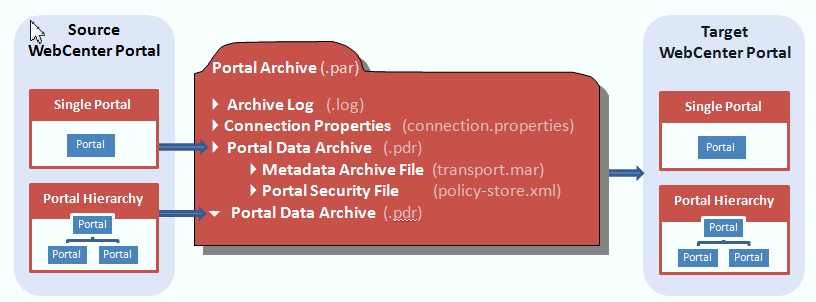
    You can use Portal Builder administration or WLST commands to export a portal archive (.par file) and then import portals from the file.
    5. Terminology changes
    Prior to 11g PS7 In 11g PS7
    WebCenter Portal: SpacesWebCenter Portal
    spaceportal
    space templateportal template
    resourceasset
    Oracle WebCenter Portal 11g R1 PS7 (11.1.1.8.0) Documentation : WebCenter Portal 11.1.1.8.0 Documentation

Friday, May 31, 2013

UCM 11g Fails to Start due to csDbFailedToGetNonEmptyTableList Error

After WebCenter 11.1.1.7.0 (PS6) installation with MS. SQL Server 2008 R2, I created one domain includes WebCenter Portal and WebCenter Content components, everything went good. When I tried to start UCM server, it fails to start with following exceptions:-

 <31/05/2013 12:16:48 PM NZST> <Error> <ServletContext-> <BEA-000000> <Could not start server of type 'server' at default relative web root URL 'cs'.javax.servlet.ServletException: Could not start up IDC server deployment.Caused By: java.io.IOException: UCM Server failed to initialize inside its servlet environment.Caused By: intradoc.data.DataException: !csDbFailedToGetNonEmtpyTableList,WebCenter,DEV_OCSS

Cause

I have configured case-sensitive database for WebCenter. In the Weblogic CSDS data source configured for MS. SQL Server, the database name case doesn't match the case on the database on SQL Server.

Such as like the database name in the data source is all lower case but the actual database name in SQL server is all upper-case even i have given same upper-case during RCU schema creation and domain creation time.

Its looking me the bug with SQL Server installation with WebCenter Content. 

Solution

In the CSDS data source, set the database name so that it exactly matches the database name in SQL Server:

1. Go to WLS Admin console, in the Domain Structure pane, expand Services

2. Select Data Sources

3. In the Summary of JDBC Data Sources pane select the CSDS link

4. In the Settings for CSDS pane select the Connection Pool tab

5. In the Properties field change the databaseName to match the case of the database on SQL Sever

Example:
Change:

databaseName=WebCenter (in my case, its change in this way)

To:

databaseName=WEBCENTER
6. Click the Save button8. Restart the Admin Server and the UCM Managed Server.

Note: As a best practice, do this steps for all data-sources configured for MS. SQL Server.

Thursday, April 4, 2013

WebCenter PS6 (11.1.1.7) and future releases


Version PS6 (11.1.1.7) of WebCenter has been released on 1st of April, 2013. PS6 includes many bug fixes in addition to enhancements to the WebCenter Content Application Extension Framework (AXF) supporting integrations with E-Business Suite and PeopleSoft.


There will be one major version 11.1.1.8.0 (PS7) of WebCenter by end of 2013. In this release, following are some highlights I learned from Oracle:-

1. there is no more two solutions (Spaces & Portal) for WebCenter. Spaces will be the part of WebCenter Framework. Only one concept that is PORTAL.

2. We can create multiple portal from Web Interface.

3. You can import/export portal archive (PAR exactly like JAR/WAR/MAR) from/to Web to/from JDeveloper for complex customization.

4. All types of popup windows will be eliminated from portal.

5. You can drag and drop Web 2.0 components and taskflows on to the page from resource catalogue.

6. Migration among different environments is easy due to PAR.


You will see WebCenter 12C in somewhere in 2014. 12C will be based on PS7 features but utilizing & certifying Weblogic 12C and other components of FMW 12C.

Monday, September 17, 2012

Top Five Clustering Guidelines for ADF


I found following five guidelines very useful as per my experience:-

1. All the beans stored in session scope, page flow scope, and view scope need to be serialized. We can serialize backingBean scope as well if any value is changing from the UI.

2. All the referenced member objects in the serialized class should implement Serializable interface.

3. It is strongly recommended that all serializable classes explicitly generate default serialVersionUID value from the JDeveloper.

4. Do not use any non-serializable (for example XMLGregorianCalendar) data type in the serialize class.

5. If any object (UI components) is not serializable then it must be marked Transient